Pipeline Identities: The Services and Their Credentials
In these labs we connect GitHub Actions to other services:
- allow GitHub Actions to push images to Docker Hub;
- allow GitHub Actions to log in to AWS;
- allow GitHub Actions to deploy to an EKS cluster;
- allow the EKS cluster to pull images from Docker Hub;
- allow GitHub Actions to post to Slack.
New to GitHub Actions? Start with GitHub Actions Workflows: an Introduction.
We'll ask you to create a new repository for these labs in your GitHub account, here <you>/pipeline-identities.
The labs build the pipeline one push at a time. Each part:
- adds one call to the workflow, and pushes;
- sees the service refuse it, since nothing is set up for it yet;
- sets the call up, and runs again: the run goes one call further.
Each service checks who is calling in its own way.
- The labs follow those checks: identities, tokens, and who trusts whom.
- Tests, environments and release flows stay out of the way.
The participants
- You: you push to your repository.
- GitHub: holds your repository, runs its workflow on a push, makes tokens for it.
- The job: a
GitHub Actions job
in the workflow we use for the demo.
- It runs on a runner: a fresh virtual machine, thrown away when the job ends.
- It makes every call that follows.
- Docker Hub: stores the Docker image, in a private repository you create in your own Docker Hub account.
- AWS:
- STS: issues temporary AWS credentials;
- IAM: holds the rules saying who may have them;
- EKS: the Kubernetes cluster, namespace
web.
- Slack: the team's channel.
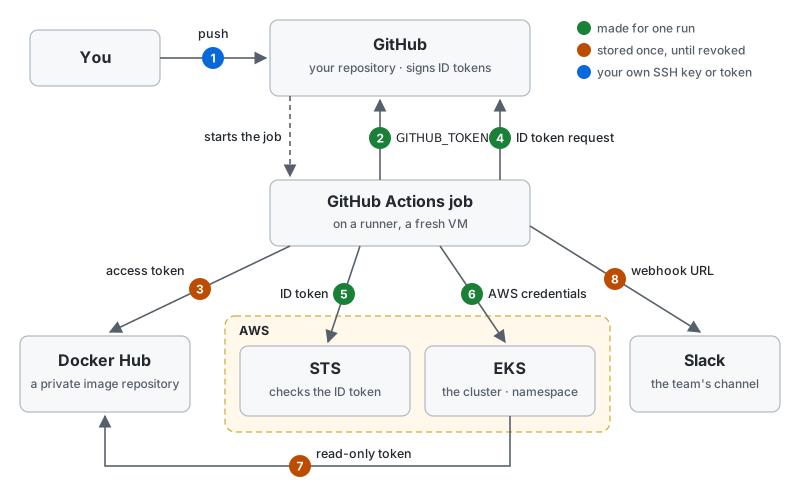
The calls, one by one
The list is the finished pipeline: one push to main makes all eight calls, in this order. Each names the part
that adds it. An arrow in the drawing points from the caller to the service it calls.
- Setup, done once by you, in the part that adds the call:
- you give the caller a credential;
- you tell the service to accept it, and what to allow.
- Sent: the caller's request, carrying the credential.
- Checked: the service checks the credential, then allows or refuses the request.
- you → your repository: push the code (
Part 1).
- Setup: you add your SSH key to your GitHub account, or create a personal access token; as the repository's owner, your account may write to it.
- Sent:
git push, over SSH with the key or over HTTPS with the token; the remote's URL picks which. - Checked: GitHub finds the account the key or token belongs to, and accepts the push if that account may write to this repository. The push then starts the workflow.
- job → GitHub: check out the code (
Part 1).
GITHUB_TOKENis an access token, not an ID: whoever holds it may act on your repository.- It allows the GitHub Actions app installed on the repository to do things in it: what it changes shows as made by
github-actions[bot]. - It reaches this one repository, with the rights the workflow's
permissions:give it, as an OAuth2 access token is limited by its scope.
- It allows the GitHub Actions app installed on the repository to do things in it: what it changes shows as made by
- Setup: none; GitHub makes the token when the job starts and hands it to the job.
- Sent: the checkout step clones your repository with the token.
- Checked: GitHub accepts it for this repository only, until the job ends.
- job → Docker Hub: push the image (
Part 2).
- Setup: you create an access token with read and write rights in your Docker Hub account, and store it in your repository's secrets.
- Sent:
docker loginwith your Docker Hub user name and the token, thendocker push. - Checked: Docker Hub finds the token on your account, and lets it push to your repositories.
- Whoever copies the token can use it, from anywhere, until you revoke it: it is a bearer token.
- job → GitHub: get an ID token (
Part 3).
- Setup: the workflow grants
id-token: write. - Sent: a request to GitHub's OpenID Provider, naming the audience, AWS.
- Returned: an ID token GitHub signs, saying which repository and branch the job runs for. It allows nothing by itself: it is a proof of identity for the next call.
- Setup: the workflow grants
- job → AWS STS: trade the ID token for AWS credentials (
Part 4).
- Setup: in IAM you register GitHub as an identity provider, and create a
role that trusts it:
tokens for your repository's
mainbranch only. - Sent: the ID token, and the role the job asks for.
- Checked: STS verifies GitHub's signature with GitHub's public keys, then the token's audience, repository and branch against the role, and returns that role's credentials for an hour: the checks prints.example runs on the OIDC page, with AWS in its place.
- Setup: in IAM you register GitHub as an identity provider, and create a
role that trusts it:
tokens for your repository's
- job → EKS: deploy the image (
Part 5).
- Setup: you add an
access entry for
the role to the cluster: it may change the namespace
web. - Sent:
kubectlrequests, signed with the AWS credentials. - Checked: EKS learns from AWS which role signed, and its access entry decides what the request may do.
- Setup: you add an
access entry for
the role to the cluster: it may change the namespace
- cluster → Docker Hub: pull the image (
Part 6).
- Setup: you create a second, read-only Docker Hub token, and store it in the cluster as an image pull secret.
- Sent: the node pulling the image logs in to Docker Hub with it.
- Checked: Docker Hub lets it read your private repository, and nothing more.
- job → Slack: post a message (
Part 7).
- Setup: you create an incoming webhook for one channel, and store its URL in your repository's secrets.
- Sent: the message, posted to the URL.
- Checked: Slack accepts any post to that URL: the URL itself is the secret.
Who grants what, and for how long
| Caller | Service | Proves who it is with | Who grants access | How long it lives |
|---|---|---|---|---|
| you | your repository | an SSH key or an access token with write access | GitHub | until you remove it |
| the job | GitHub | GITHUB_TOKEN | GitHub | until the job ends |
| the job | Docker Hub | an access token stored in GitHub | Docker Hub | until revoked |
| the job | AWS | an ID token signed by GitHub | AWS, by IAM's rules | one hour |
| the job | EKS | the AWS credentials | EKS, by its access entries | one hour |
| the cluster | Docker Hub | a read-only token stored in the cluster | Docker Hub | until revoked |
| the job | Slack | a webhook URL stored in GitHub | Slack | until revoked |